You just need a simple table. Three columns, five rows, nothing fancy. You open your .tex file, type \begin{tabular}, and twenty minutes later you're counting ampersands, wondering why your columns are misaligned, and questioning your career choices.
If this sounds familiar, you're not alone. In my decade of writing LaTeX, tables have been by far the single most frustrating part of the experience. And when I started building Lyra Editor, tables were the number one feature request from users.
What you want vs. what you write
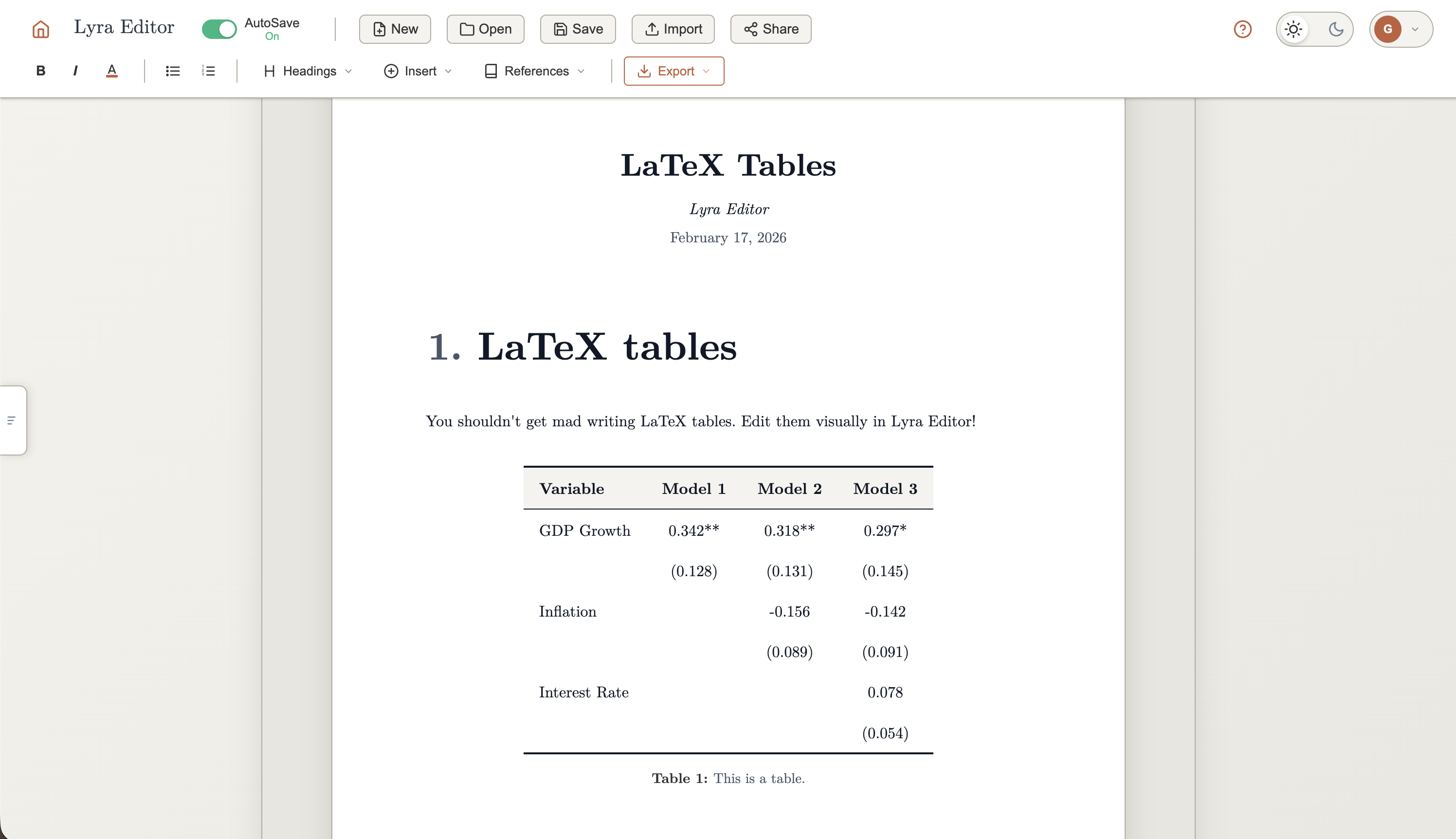
Let's say you need a table for a paper. Something clean, with proper formatting. Here's what that looks like in LaTeX:
\begin{table}[htbp]
  \centering
  \caption{Regression Results}
  \begin{tabular}{lccc}
    \toprule
    Variable & Model 1 & Model 2 & Model 3 \\
    \midrule
    GDP Growth   & 0.342** & 0.318** & 0.297*  \\
                 & (0.128) & (0.131) & (0.145) \\
    Inflation    &         & -0.156  & -0.142  \\
                 &         & (0.089) & (0.091) \\
    Interest Rate &        &         & 0.078   \\
                 &         &         & (0.054) \\
    \midrule
    Observations & 120     & 120     & 118     \\
    R-squared    & 0.24    & 0.31    & 0.33    \\
    \bottomrule
  \end{tabular}
\end{table}
That's 18 lines of code for a fairly standard regression table. Every & has to line up. Every \\ has to be in the right place. And you won't see what it actually looks like until you compile.
Why tables are uniquely painful
Most LaTeX formatting is tolerable. Bold text? \textbf{}, fine. A section heading? \section{}, no problem. But tables combine every frustrating aspect of LaTeX into one experience.
No visual feedback. You're editing a grid of data by manipulating lines of text. You can't see column widths, alignment, or spacing until you compile. With a paragraph, you can more or less imagine the output. With a table, you're flying blind.
Adding a column means editing every row. Need a fourth column in a 20-row table? You have to add an & and a value to each of those 20 lines, plus update the column specification in \begin{tabular}. In any other tool, this takes one click.
Merging cells is cryptic. \multicolumn{3}{c}{Header} is not intuitive syntax. \multirow is worse, as it requires a separate package and interacts oddly with vertical spacing. Combining both in the same table is an exercise in patience.
The rules situation is a mess. \hline, \cline, \toprule, \midrule, \bottomrule—which do you use? The booktabs package gives you beautiful rules, but mixing it with vertical lines produces ugly results. And adjusting the spacing around rules often requires manual \addlinespace tweaks.
Placement is a gamble. You write [h] for "here." LaTeX reads it as "suggestion noted" and puts your table on the next page. You try [H] from the float package, which works but breaks your text flow. Table placement in LaTeX is a negotiation you rarely win.
The workarounds everyone uses
The LaTeX community has developed a whole ecosystem of workarounds for tables. Online generators where you type data into a grid and get code to paste. Excel-to-LaTeX scripts that convert spreadsheets into tabular environments. Boilerplate snippets that people copy and modify for each new table.
These tools help, but they all share the same limitation: they get you the initial table, and then you're back in raw code for every edit. Changed your data? Back to counting ampersands. Reviewer wants a different column order? Manual surgery on every row. Need to merge two header cells? Time to look up \multicolumn syntax again.
Some people avoid tables altogether, converting their data into figures instead. That tells you something about how bad the problem is: people would rather learn matplotlib or pgfplots than deal with tabular.
What table editing should look like
Here's the thing: every other writing tool figured this out years ago. Google Docs, Notion, Word: you click to add a row, drag to resize a column, merge cells by selecting them. You see your table as you build it.
There's no reason LaTeX users should be stuck in 1985 when it comes to table editing. The output can still be beautiful formatted LaTeX. But the editing experience should be visual.
That's exactly what we built in Lyra Editor. You create and edit tables the way you'd expect, clicking, typing, seeing the result immediately. Behind the scenes, it generates clean LaTeX code with proper formatting. You can add rows and columns in one click, merge cells visually, and rearrange your data without touching a single ampersand.
And because Lyra Editor outputs real LaTeX, you can always export your document and open it in any editor. Your table code will look like something you wrote by hand, because it's the same code, just without the pain of writing it by hand.
Tables shouldn't be the hard part
Writing a paper is hard enough. Structuring an argument, analyzing data, responding to reviewers, that's the real work. Formatting a table shouldn't cost you twenty minutes of debugging ampersand alignment.
If you've ever dreaded adding a table to your LaTeX document, give Lyra Editor a try at lyraeditor.com. Your tables will look just as good. You just won't suffer making them.